Skip to content
AgencyProofby Intelliblitz
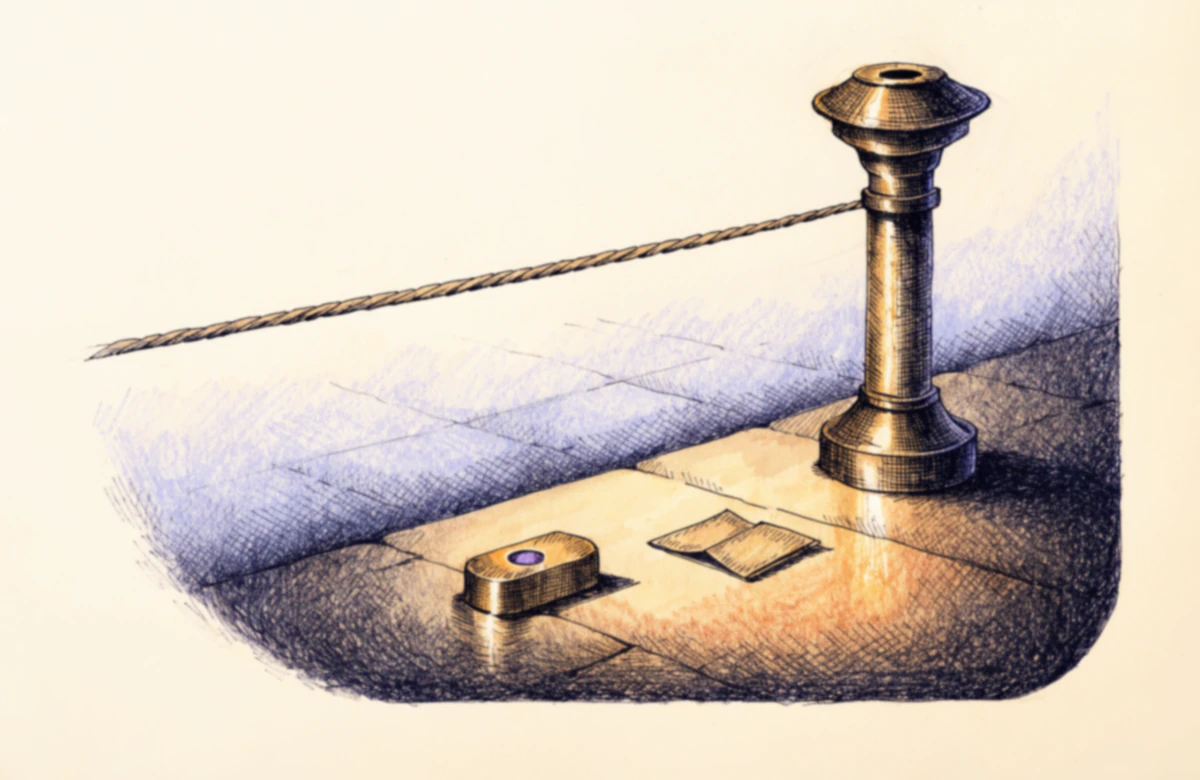
A browser-window craft rests in a wooden inspection cradle beneath two rig arms with amber and green lamp heads; a column of three page-status lamps stands beside it.

Product / The engine spec

An inspection engine, not a checklist.

The full spec of what runs between “paste URL” and “here’s your report” — including the part most audit pages leave vague. There are two levels of inspection, and they are not the same audit run twice.

A Snapshot Audit reads the HTML each page serves. A Launch Audit opens a real browser on a subset of those pages and measures what the browser actually did. The 54 deterministic checks, the AI-assisted review layer and the ten-dimension score are shared by both.

54 checks · ten scored dimensions · two inspection depths

Public-page inspection; authenticated areas are out of scope. We notify you when the report is ready.
Two depths, one engine

Choose your audit depth.

Both panels below are complete. Neither is a teaser for the other: the Snapshot Audit states what it does and where it stops, and the Launch Audit states the same things at a different depth. The row-by-row comparison is further down the page if you want to read them against each other.

Snapshot Audit

ONE-TIME
$299one-time

The pre-launch read of the site as it is served: fast to run, deterministic, and honest about the fact that no browser was opened.

Snapshot inspects up to 10 reachable public pages, static HTML only. The report records actual coverage.

Coverage

  • Inspection of up to 10 public pages.
  • “Up to” means reachable, in-scope public pages, not the entire domain.
  • Public-page inspection; authenticated areas are out of scope.

How pages are inspected

  • Reads the HTML each page serves. JavaScript is not executed and no browser is opened.
  • 54 deterministic checks across ten scored dimensions.
  • AI-assisted diagnostics and implementation guidance, with the method and confidence shown in the report. AI findings are labelled in the report, so a judgment call never passes as a measurement.
  • Automated accessibility basics.
  • Checks first-pass performance signals on sampled pages.
  • Checks for dead-end link patterns.
  • Not part of this depth: rendered-browser inspection, automated axe checks, Lighthouse lab measurements, link-status verification, the journey walkthrough and the checkout architecture review. Those are Launch Audit capabilities.

What you receive

  • A ten-category Launch Readiness Score and category scorecard.
  • AgencyProof Launch Readiness Score and a rules-based Hold, Conditionally ready, or Ready verdict.
  • An executive brief for the person who is not going to read the findings.
  • Each reported issue shows the observation and available evidence captured by that scan.
  • Evidence shows an observation at scan time. It does not establish cause.
  • Prioritized implementation tasks with acceptance and re-scan guidance where available.
  • Suggested rewrite where the audit generates one.
  • Copy the audit’s fix prompt into your implementation assistant. The prompt is copied or exported from the workspace. It is not an integration and not automatic remediation.
  • Report export. Report as Markdown, developer checklist as Markdown or CSV, and a designed A4 PDF.
  • The report states the exact checks completed for that scan.

After the audit

  • Keep completed scans and compare results over time. Completed scans are runs you started, kept for comparison.
  • Compare two completed scans to see score and finding changes. A comparison needs two completed scans and compatible data.
  • No re-scan is included. A further audit spends a further credit.
  • We notify you when the report is ready.
Launch Audit

ONE-TIME
$799one-time

The flagship pass: a real browser on the pages that matter, measurements instead of estimates, and an operator who reads the report before you do.

Launch Audit reviews up to 35 reachable public pages and inspects up to 12 of them in a real rendered browser. The report records actual coverage.

Coverage

  • Inspection of up to 35 public pages, up to 12 in a real browser.
  • “Up to” means reachable, in-scope public pages, not the entire domain.
  • Public-page inspection; authenticated areas are out of scope.

How pages are inspected

  • Inspects selected pages in a real rendered browser, after JavaScript has run.
  • 54 deterministic checks across ten scored dimensions, plus the rendered checks below.
  • AI-assisted diagnostics and implementation guidance, with the method and confidence shown in the report. AI findings are labelled in the report, so a judgment call never passes as a measurement.
  • Detects pages whose content depends on JavaScript to appear at all.
  • Captures browser console errors observed while the page loads.
  • Automated axe checks on selected rendered pages.
  • Lighthouse lab performance measurements on the homepage, in both form factors.
  • Requests a bounded sample of links and records the HTTP status each one returned.
  • Detects insecure resources loaded on secure pages, from the browser network record.
  • Measures the transfer weight of the images the browser actually loaded.
  • Walks the primary customer journey by navigation, and records where it breaks.
  • Inspects selected forms and their validation behaviour without submitting them. Reviews the checkout entry points, provider and calls to action as published on the public pages. No payment details are entered and no transaction is completed.
  • Compares the site against competitors you supply, as advisory context.

What you receive

  • A ten-category Launch Readiness Score and category scorecard.
  • AgencyProof Launch Readiness Score and a rules-based Hold, Conditionally ready, or Ready verdict.
  • An executive brief for the person who is not going to read the findings.
  • Each reported issue shows the observation and available evidence captured by that scan.
  • Evidence shows an observation at scan time. It does not establish cause.
  • Prioritized implementation tasks with acceptance and re-scan guidance where available.
  • Suggested rewrite where the audit generates one.
  • Copy the audit’s fix prompt into your implementation assistant. The prompt is copied or exported from the workspace. It is not an integration and not automatic remediation.
  • Report export. Report as Markdown, developer checklist as Markdown or CSV, and a designed A4 PDF.
  • The report states the exact checks completed for that scan.
  • An AgencyProof operator reviews and releases the report; it is not published automatically.

After the audit

  • Keep completed scans and compare results over time. Completed scans are runs you started, kept for comparison.
  • Launch Audit includes one re-scan after the initial completed scan, with no expiry deadline. The included re-scan runs at Launch Audit depth, so the before and after are measured the same way.
  • Compare two completed scans to see score and finding changes. A comparison needs two completed scans and compatible data.
  • Launch Readiness Certificate: Not included with purchase. Issued only after a standalone $799 Launch Audit completes the approved rendered coverage, earns a Ready verdict — a Launch Readiness Score of 85 or above with no launch blockers and no high-priority findings open — and an AgencyProof operator has reviewed, approved and released the report.
  • We notify you when the report is ready.

“Up to” means reachable, in-scope public pages, not the entire domain. The report states the exact checks completed for that scan. No payment details are entered and no transaction is completed.

Shared by both audit depths

First pass: 54 deterministic checks.

Every reviewed page becomes a structured snapshot — title, meta tags, headings, links, image filenames, forms, JSON-LD. The checks read the snapshot and file findings with the evidence attached: the exact tag, filename, or missing line. Same input, same findings, no model in the loop.

This layer, the AI-assisted review beside it and the ten-dimension score below are the same on a Snapshot Audit and a Launch Audit. What the Launch Audit changes is where the input comes from — inspects selected pages in a real rendered browser, after JavaScript has run.

  • unsupported-claims
  • missing-title
  • organization-structured-data
  • dead-end-links
  • privacy-policy-link
  • image-alt-text
  • script-bloat
  • ai-cliche-copy
  • homepage-cta
  • compliance-language
  • …and 44 more
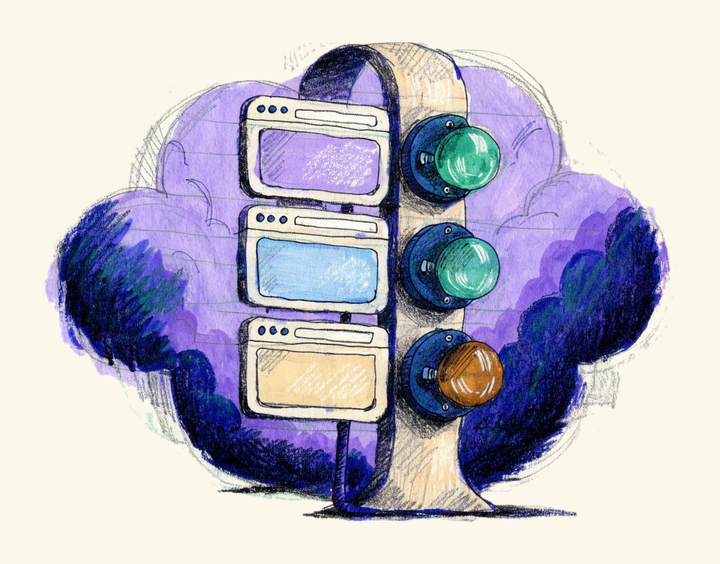
Three identical browser plates in a vertical wooden rack, each beside a round status lamp: green, green, amber.

Ten dimensions, weighted into one score.

Each finding deducts from its category; each category carries a fixed weight in the Launch Readiness Score. The weights don’t move between scans, and the model has no opinion about how pretty the site is.

The ten scoring dimensions
  • Trust & Credibility18%

    Proof, credibility signals, believable claims, and the things that make a visitor trust the site enough to act.

  • SEO Readiness14%

    Titles, descriptions, headings, canonicals, and the metadata search engines need to rank the site.

  • AI Search Readiness10%

    Entity clarity, structured data, and whether AI assistants can tell who you are and what you do.

  • Technical QA14%

    Dead-end link patterns, empty hrefs, missing infrastructure files, and the plumbing that quietly fails after launch.

  • Privacy & Metadata10%

    A privacy-policy link, and potentially revealing image filenames.

  • Accessibility Basics8%

    Automated accessibility basics. Alt text, language attributes and the baseline signals a static page can be read for. Automated accessibility checks do not establish WCAG or legal conformance and do not replace manual testing with assistive technologies.

  • Performance Basics8%

    Oversized images, script weight and first-pass performance signals in the page as served. Static performance signals and Lighthouse lab measurements, when present, are point-in-time diagnostics. They are not field data or a guarantee of user experience.

  • Content Quality8%

    AI-cliché copy, hype language, and text that reads like a template instead of a business.

  • Conversion Clarity6%

    Clear audience, clear offer, a contact path present on the page, and CTAs that actually ask for something.

  • Compliance-Sensitive Copy4%

    Language that may need review before use in regulated or claims-sensitive contexts. Not legal advice.

Weighted average → Launch Readiness Score100%
See every deterministic inspection(54)

Grouped by the dimension each one scores. This list is the catalog the engine runs from, so the total above is the length of this list — not a number written beside it. The report states the exact checks completed for that scan.

Trust & Credibility4

  • Outcome promises with nothing behind them
  • Superlatives asserting rank without a source
  • Social proof that can't be verified
  • Founder and team named, not anonymous

SEO Readiness17

  • Pages shipping without a <title> tag
  • Placeholder page titles
  • Titles too short to say anything
  • Titles long enough to truncate
  • Missing meta descriptions
  • Meta descriptions too thin
  • Meta descriptions past the truncation line
  • Pages with no H1 heading
  • Multiple H1s competing on one page
  • No canonical URLs declared
  • Canonicals point where they should (not off-site, not all to the homepage)
  • Duplicate titles across pages
  • Duplicate meta descriptions across pages
  • Homepage Open Graph title
  • Homepage Open Graph description
  • Open Graph share image
  • Twitter card metadata

AI Search Readiness4

  • Organization structured data (JSON-LD)
  • Brand named in the homepage title
  • AI assistant crawlers (GPTBot, ClaudeBot, Perplexity…) allowed in robots.txt
  • llms.txt guidance file for AI assistants

Technical QA9

  • Links that lead nowhere (empty or "#" href)
  • javascript: hrefs standing in for navigation
  • robots.txt present
  • Sitemap fetched, parsed, and validated
  • Pages indexable (no noindex directives or robots.txt blocks)
  • Favicon declared
  • Served over HTTPS with HSTS (no plaintext origin)
  • Security response headers (CSP, X-Frame-Options, X-Content-Type-Options, Referrer-Policy, Permissions-Policy)
  • Cookie Secure/HttpOnly/SameSite attributes

Privacy & Metadata3

  • Privacy policy linked
  • Image filenames leaking metadata
  • Client-side analytics, tag, and consent tools (client-side, cap-scoped)

Accessibility Basics4

  • Images missing an alt attribute (decorative alt="" respected)
  • Document language declared and plausible
  • Viewport meta tag present
  • Viewport allows pinch-zoom (WCAG 1.4.4)

Performance Basics6

  • Script tag bloat
  • Possible un-optimized originals (filename heuristic)
  • Measured HTML document weight
  • HTML compression (gzip/brotli) on the wire
  • Measured server response time (TTFB)
  • Redirect hops before the page lands

Content Quality1

  • Stock AI-cliché copy

Conversion Clarity4

  • Homepage call-to-action (missing, weak, oversupplied, or dead-end)
  • A contact path exists somewhere
  • Audience named, not addressed to everyone
  • Hero headline that could belong to any company

Compliance-Sensitive Copy2

  • Compliance-sensitive phrases
  • "Certified" without a named certification

Snapshot inspects up to 10 reachable public pages, static HTML only. The report records actual coverage. Launch Audit reviews up to 35 reachable public pages and inspects up to 12 of them in a real rendered browser. The report records actual coverage.

Automated accessibility checks do not establish WCAG or legal conformance and do not replace manual testing with assistive technologies.

Static performance signals and Lighthouse lab measurements, when present, are point-in-time diagnostics. They are not field data or a guarantee of user experience.

AgencyProof identifies wording that may need evidence or specialist review. It does not provide legal advice or determine regulatory compliance.

Entity and crawler signals can reduce ambiguity. They do not guarantee rankings, citations or recommendations by an AI system.

The deduction math per finding — critical −25 down to enhancement −2 — is published step by step on how it works.

Shared by both audit depths

Then the judgment layer reads it.

Deterministic checks can count your meta tags. They can’t tell you that “guaranteed 10x growth” is a lawsuit wearing a font. The AI audit reads like a skeptical buyer with a compliance lawyer on speed dial: unbacked claims, bot-flavored copy, language that may require review, and whether a stranger could tell what the business does.

It runs on both audit depths, and it is never allowed to hide inside the deterministic result. Each finding it files carries its source, its method and a confidence level, and the report states them next to the finding rather than in a footnote — so you can weigh a judgment call as a judgment call.

source: ai
Inspection ticket
High priorityCompliance

Health-outcome claims that may need review before publication

FILED ON · https://marlowdental.example/

Evidence
Two homepage claims describe treatment outcomes: "Pain-free treatment — guaranteed." (hero) and "Instant results with our whitening treatments."
Suggested rewrite
Whitening results you can see, with a plan tailored to your teeth — we'll walk you through realistic expectations at your consultation.

AI-assisted diagnostics and implementation guidance, with the method and confidence shown in the report. Findings include a confidence and method label. Every AI finding carries a source: ai chip — on the finding card in the report and in the exported Markdown — so a judgment call never passes as a measurement.

Entity and crawler signals can reduce ambiguity. They do not guarantee rankings, citations or recommendations by an AI system.

Inspector Dot holds a large round lens over a browser evidence plate on a wooden desk beside a small lamp.

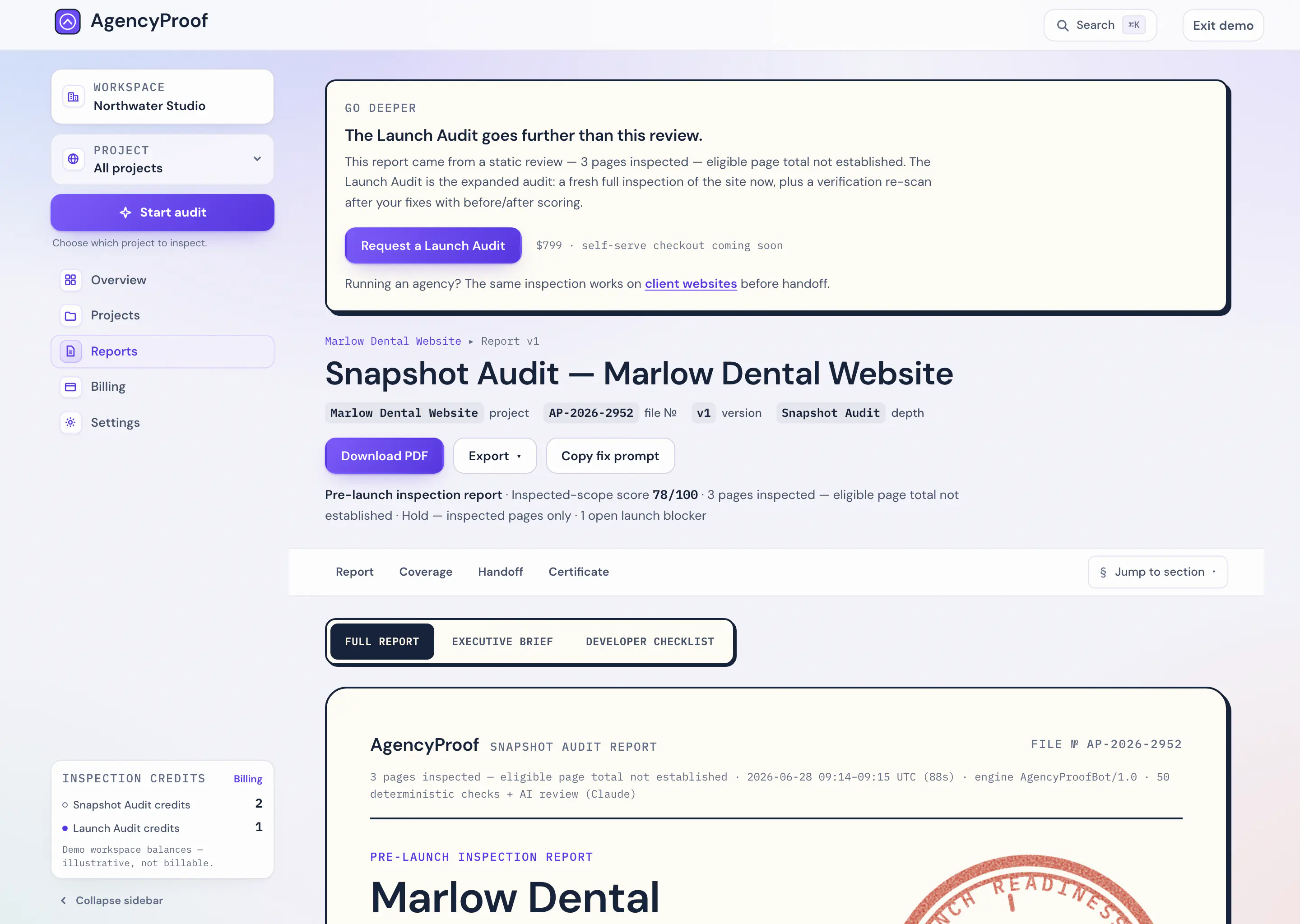
What a scan looks like in the workspace.

Below: the findings queue and scan history from the demo workspace — Northwater Studio auditing Marlow Dental, the sample client. Every row is seeded demo data, not a customer. The figures describe only the pages this demo inspected.

Review findings grouped by priority, owner and effort. Prioritized, not project-managed. Nothing here changes a finding’s status or assigns it to a person — the workspace groups what the scan found, it does not run your project.

Inspector Dot slides a browser evidence plate into an open wooden drawer that already holds a neat row of plates.
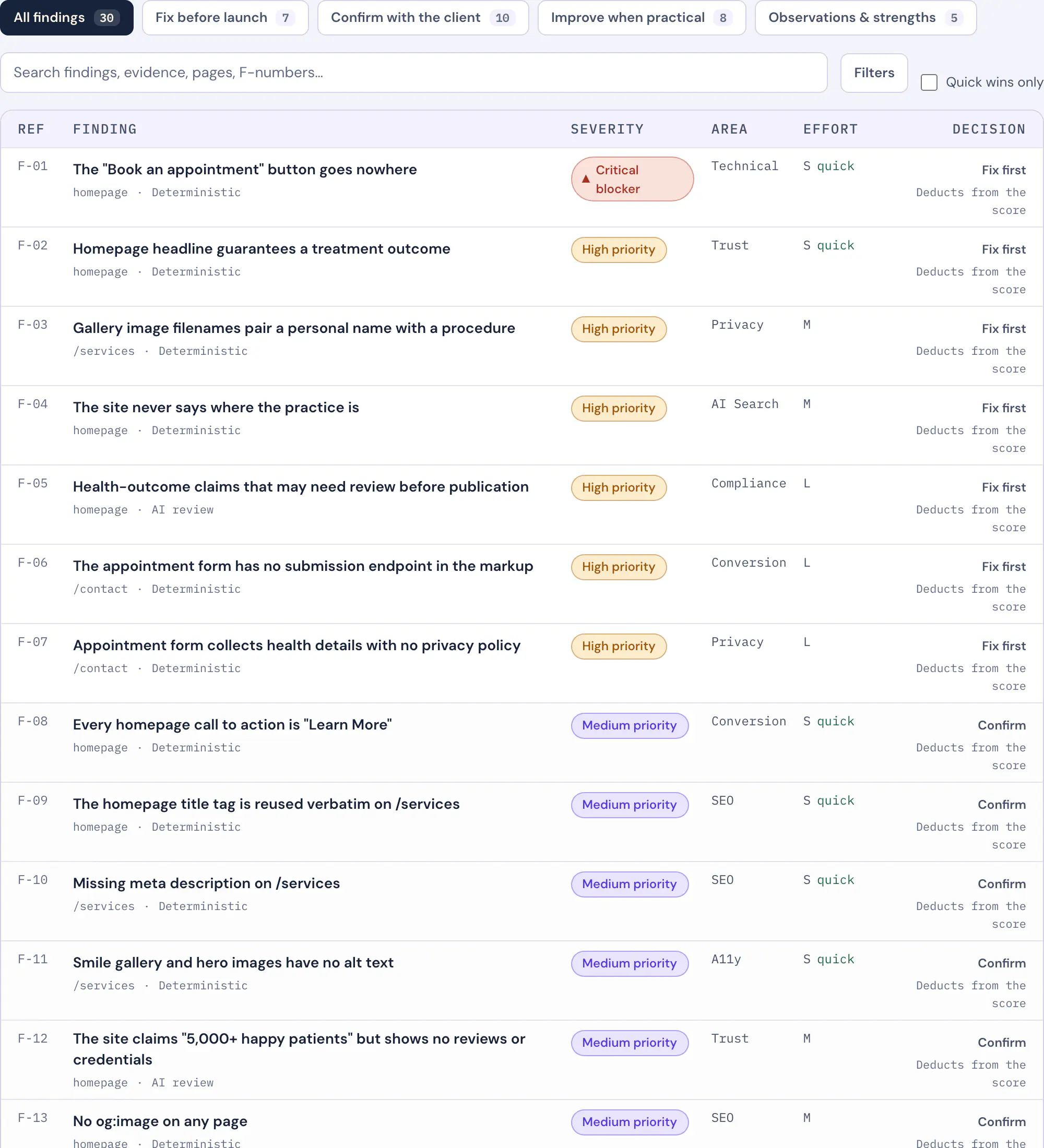
Findings · Marlow Dental Website30 findings · showing 4
  • Critical blockerTechnicalsource: deterministic

    The "Book an appointment" button goes nowhere

    /

  • High priorityTrustsource: deterministic

    Homepage headline guarantees a treatment outcome

    /

  • High priorityCompliancesource: ai

    Health-outcome claims that may need review before publication

    /

  • Medium priorityPerfsource: deterministic

    The hero image is a 4.8 MB uncompressed PNG

    /

26 more findings in the sample report

Scan history
  • Jun 28, 2026

    3 pages · 30 findings · 1 critical

    78
  • Jul 7, 2026

    re-scan after fixes · 0 critical

    91+13

“Launch readiness went from 78 to 91” is a sentence a client understands without a meeting.

See queued, running, retrying, failed and completed scan states; paid plans include completed-scan history. Completed scans are runs you started, kept for comparison. A comparison needs two completed scans and compatible data.

See the full sample report
fix-prompt.md — trimmed
·You are a senior web developer and copy editor improving the launch readiness of a website based on an AgencyProof audit.
·
Site: https://marlow-dental.example
Current launch readiness score: 78/100. Resolve the issues below so a re-scan comes back clean.
·
·## Issues to fix (already sorted by severity — work top to bottom)
1. [CRITICAL] [Trust & Credibility] Homepage headline guarantees a treatment outcome
· Fix: Replace the guarantee with what the practice can stand behind…
2. [CRITICAL] [Technical QA] The “Book an appointment” button goes nowhere
3. [CRITICAL] [Privacy & Metadata] Patient names in before/after photo filenames
· 27 more issues

Hand the fix list to the machine that made the mess.

Every report ships with a fix prompt: the complete issue list — sorted by severity, with evidence, fixes, tasks, and approved rewrites — formatted as instructions for Claude or any coding agent. Copy, paste, re-scan.

One click in the report viewer. No reformatting. The figures describe only the pages this demo inspected.

The prompt is copied or exported from the workspace. It is not an integration and not automatic remediation.

Report as Markdown, developer checklist as Markdown or CSV, and a designed A4 PDF. Included with the Snapshot Audit and the Launch Audit alike.

Close view of the audit folio in the pigeon's claws: empty green score ring, browser evidence plate, green seal.

A structured report with an executive brief, prioritized findings and implementation guidance.

What lands in your hands

The report, and everything around it.

Most of this list is identical on both depths — the report is the product, and the Snapshot Audit is not a trimmed version of it. The rows that genuinely need a Launch Audit are marked as such, and nothing else is.

What you get

  • Launch Readiness Score

    Snapshot Audit

    ten categories

    Launch Audit

    ten categories

  • Executive brief

    Snapshot Audit

    Included

    Launch Audit

    Included

  • Suggested rewrites

    Snapshot Audit

    Where generated

    Suggested rewrite where the audit generates one.

    Launch Audit

    Where generated

    Suggested rewrite where the audit generates one.

  • Copyable fix prompt for your coding assistant

    Snapshot Audit

    Included

    The prompt is copied or exported from the workspace. It is not an integration and not automatic remediation.

    Launch Audit

    Included

    The prompt is copied or exported from the workspace. It is not an integration and not automatic remediation.

  • Report export

    Snapshot Audit

    Included

    Report as Markdown, developer checklist as Markdown or CSV, and a designed A4 PDF.

    Launch Audit

    Included

    Report as Markdown, developer checklist as Markdown or CSV, and a designed A4 PDF.

Review and release

  • Operator review before release

    Needs Launch Audit

    Snapshot Audit

    Not included

    The report is released to you as soon as it is ready.

    Launch Audit

    Included

    An AgencyProof operator reviews and releases the report; it is not published automatically.

After the audit

  • Completed-scan history

    Snapshot Audit

    Included

    Completed scans are runs you started, kept for comparison.

    Launch Audit

    Included

    Completed scans are runs you started, kept for comparison.

  • Scan comparison

    Snapshot Audit

    Included

    A comparison needs two completed scans and compatible data.

    Launch Audit

    Included

    A comparison needs two completed scans and compatible data.

  • Included re-scan

    Needs Launch Audit

    Snapshot Audit

    Not included

    A further audit is a further credit.

    Launch Audit

    one re-scan, no expiry

    The included re-scan runs at Launch Audit depth, so the before and after are measured the same way.

  • Launch Readiness Certificate

    Needs Launch Audit

    Snapshot Audit

    Not available

    Launch Audit

    By eligibility only

    Not included with purchase. Issued only after a standalone $799 Launch Audit completes the approved rendered coverage, earns a Ready verdict — a Launch Readiness Score of 85 or above with no launch blockers and no high-priority findings open — and an AgencyProof operator has reviewed, approved and released the report.

Export and access

Report as Markdown, developer checklist as Markdown or CSV, and a designed A4 PDF. Download a designed A4 PDF generated from the report after it is ready. Open a full report, executive brief and developer checklist after the report is available and entitled. We notify you when the report is ready.

The report states the exact checks completed for that scan. AgencyProof inspects a bounded sample of reachable public pages. The report records the pages and methods used, plus important checks that were not performed.

Captured from the workspace

Where the findings land.

Review findings grouped by priority, owner and effort. Prioritized, not project-managed. The workspace orders what the scan found so the person fixing it can start at the top — it does not assign work or run your project.

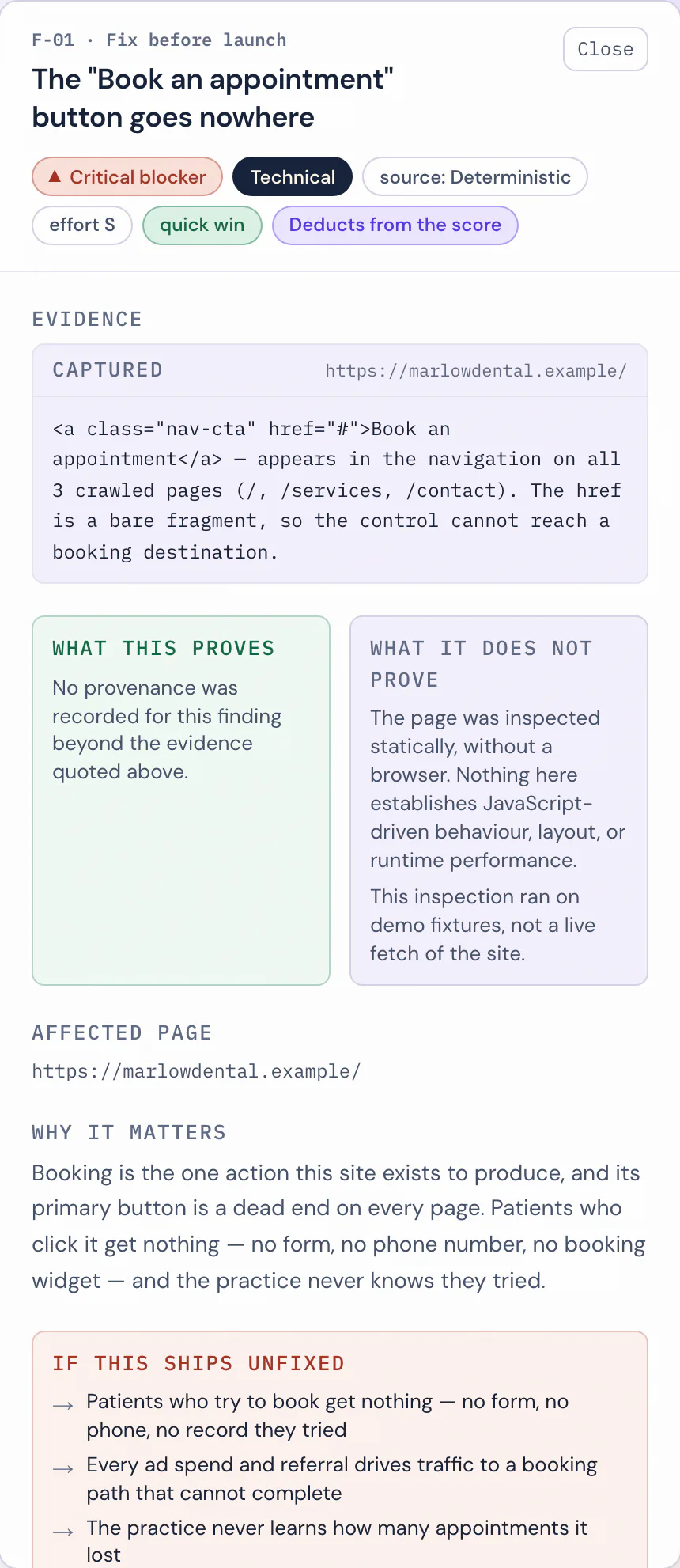
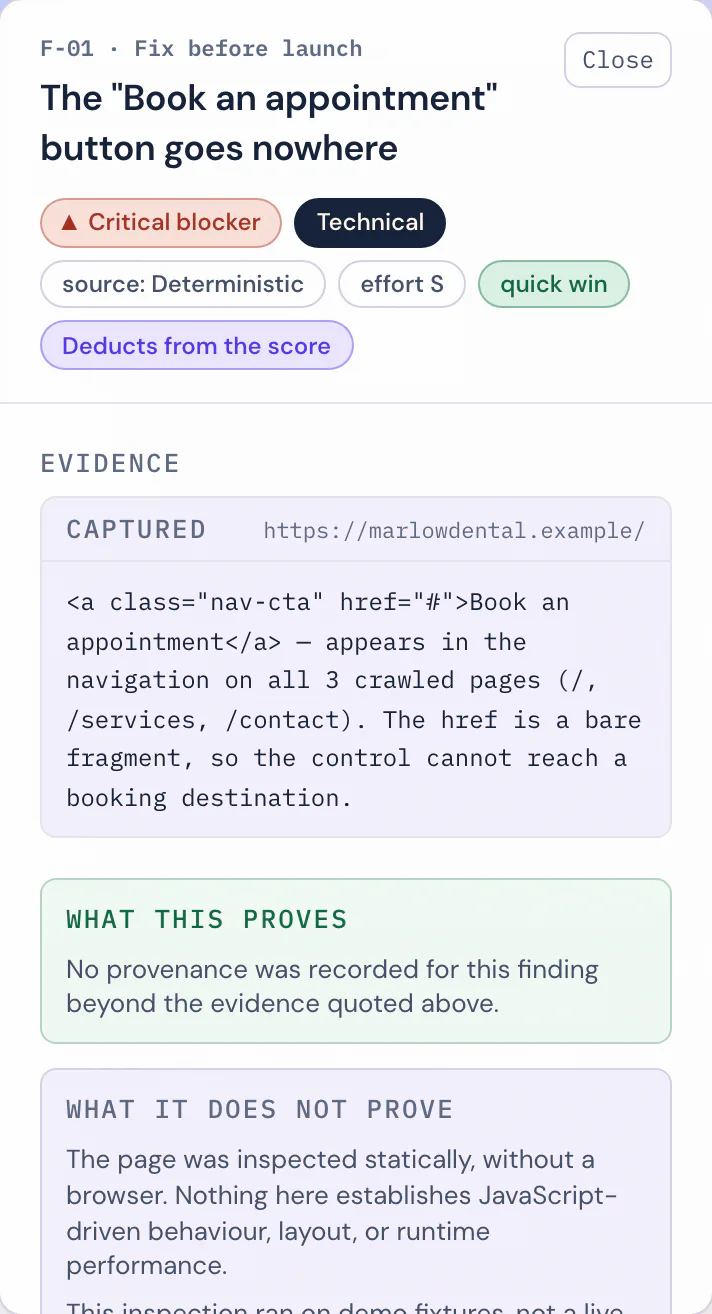
Mobile close-up of the finding detail panel: the observation, the recommended fix and the affected URL.
Each reported issue shows the observation and available evidence captured by that scan. Evidence shows an observation at scan time. It does not establish cause.

The deliverable

The report is the product.

A structured report with an executive brief, prioritized findings and implementation guidance. It reads in the workspace first — executive summary up top, findings underneath — and it leaves the workspace in formats a client and a developer can actually use.

Report as Markdown, developer checklist as Markdown or CSV, and a designed A4 PDF. Download a designed A4 PDF generated from the report after it is ready.

Open a full report, executive brief and developer checklist after the report is available and entitled. The export entitlement is the same on the Snapshot Audit and the Launch Audit — depth changes what the report contains, not what you may do with it.

Mobile close-up of a filed report card in the reports library, carrying its file number and version and review-depth chips.
Every released report is filed in the library with a file number, a version and its review depth on the record.

Before and after

The figures describe only the pages this demo inspected.

The re-scan is measured in findings, not vibes.

Compare two completed scans to see score and finding changes. A comparison does not just show a score moving — it reconciles the two findings lists row by row: what was resolved, what persists, and what the fix pass itself introduced. All three end up on the record, including the third one.

Keep completed scans and compare results over time. Completed scans are runs you started, kept for comparison.

A comparison needs two completed scans and compatible data.

Scan comparison · Marlow Dental Website

Jun 28, 2026

78

Jul 7, 2026

91+13
Resolved since the first scan
Findings from the first scan that the re-scan no longer observes.
11
Persisting
Observed by both scans — still on the record, matched row to row.
10
Introduced by the fix pass
New findings the re-scan observed that the first scan did not.
2

Rendered from the AgencyProof workspace using fictional demo data.

Row by row

The two depths, side by side.

Every row states what each depth actually does, with its limit in the same cell. Where a capability is real but bounded, the cell says so instead of printing a tick and hoping you read a footnote.

Coverage

  • Reachable public pages reviewed

    Snapshot Audit · $299
    Partly included:Up to 10 pages“Up to” means reachable, in-scope public pages, not the entire domain.
    Launch Audit · $799
    Partly included:Up to 35 pages“Up to” means reachable, in-scope public pages, not the entire domain.
  • Static HTML inspection

    Snapshot Audit · $299
    Included:Every reviewed pageReads the HTML each page serves. JavaScript is not executed and no browser is opened.
    Launch Audit · $799
    Included:Every reviewed page
  • Pages inspected in a real rendered browser

    Snapshot Audit · $299
    Not included:NoneReads the HTML each page serves. JavaScript is not executed and no browser is opened.
    Launch Audit · $799
    Partly included:Up to 12 pagesA subset of the reviewed pages — rendering is the expensive half, and the report records which pages were rendered.

How pages are inspected

  • JavaScript execution and SPA-dependence detection

    Snapshot Audit · $299
    Not included:Not includedJavaScript is not executed.
    Launch Audit · $799
    Included:IncludedDetects pages whose content depends on JavaScript to appear at all.
  • Browser console errors

    Snapshot Audit · $299
    Not included:Not includedNo browser is opened.
    Launch Audit · $799
    Included:IncludedCaptures browser console errors observed while the page loads.
  • Deterministic checks

    Snapshot Audit · $299
    Included:54 checksThe report states the exact checks completed for that scan.
    Launch Audit · $799
    Included:54 checks, plus the rendered checksThe report states the exact checks completed for that scan.
  • AI-assisted review

    Snapshot Audit · $299
    Included:IncludedAI-assisted diagnostics and implementation guidance, with the method and confidence shown in the report.
    Launch Audit · $799
    Included:IncludedAI-assisted diagnostics and implementation guidance, with the method and confidence shown in the report.
  • Accessibility basics

    Snapshot Audit · $299
    Included:IncludedAutomated accessibility basics.
    Launch Audit · $799
    Included:IncludedAutomated accessibility basics.
  • Automated axe checks

    Snapshot Audit · $299
    Not included:Not included
    Launch Audit · $799
    Partly included:On rendered pagesAutomated axe checks on selected rendered pages.

What gets measured

  • Static performance signals

    Snapshot Audit · $299
    Included:IncludedChecks first-pass performance signals on sampled pages.
    Launch Audit · $799
    Included:IncludedChecks first-pass performance signals on sampled pages.
  • Lighthouse lab measurements

    Snapshot Audit · $299
    Not included:Not included
    Launch Audit · $799
    Partly included:Homepage, both form factorsLighthouse lab performance measurements on the homepage, in both form factors.
  • Link-pattern inspection

    Snapshot Audit · $299
    Included:IncludedChecks for dead-end link patterns.
    Launch Audit · $799
    Included:IncludedChecks for dead-end link patterns.
  • Link-by-link HTTP status verification

    Snapshot Audit · $299
    Not included:Not includedLinks are read, not requested.
    Launch Audit · $799
    Partly included:On a bounded sampleRequests a bounded sample of links and records the HTTP status each one returned.
  • Mixed-content detection

    Snapshot Audit · $299
    Not included:Not included
    Launch Audit · $799
    Included:IncludedDetects insecure resources loaded on secure pages, from the browser network record.
  • Image weight

    Snapshot Audit · $299
    Partly included:EstimatedRead from the page as served, not from what a browser loaded.
    Launch Audit · $799
    Included:MeasuredMeasures the transfer weight of the images the browser actually loaded.

Journeys, forms and checkout

  • Primary customer-journey walkthrough

    Snapshot Audit · $299
    Not included:Not included
    Launch Audit · $799
    Included:IncludedWalks the primary customer journey by navigation, and records where it breaks.
  • Form markup inspection

    Snapshot Audit · $299
    Included:IncludedForms are located and their markup read.
    Launch Audit · $799
    Included:IncludedForms are located and their markup read.
  • Form-validation behaviour

    Snapshot Audit · $299
    Not included:Not included
    Launch Audit · $799
    Included:IncludedInspects selected forms and their validation behaviour without submitting them.
  • Real form submission

    Snapshot Audit · $299
    Not included:Never
    Launch Audit · $799
    Not included:NeverForms are inspected, never filled in or sent.
  • Checkout architecture review

    Snapshot Audit · $299
    Not included:Not included
    Launch Audit · $799
    Partly included:Architecture onlyReviews the checkout entry points, provider and calls to action as published on the public pages.
  • Real payment transaction

    Snapshot Audit · $299
    Not included:Never
    Launch Audit · $799
    Not included:NeverNo payment details are entered and no transaction is completed.
  • Competitive comparison

    Snapshot Audit · $299
    Not included:Not included
    Launch Audit · $799
    Partly included:When you supply competitorsCompares the site against competitors you supply, as advisory context.

Review and release

  • Operator review before release

    Snapshot Audit · $299
    Not included:Not includedThe report is released to you as soon as it is ready.
    Launch Audit · $799
    Included:IncludedAn AgencyProof operator reviews and releases the report; it is not published automatically.

What you get

  • Launch Readiness Score

    Snapshot Audit · $299
    Included:ten categories
    Launch Audit · $799
    Included:ten categories
  • Executive brief

    Snapshot Audit · $299
    Included:Included
    Launch Audit · $799
    Included:Included
  • Suggested rewrites

    Snapshot Audit · $299
    Included:Where generatedSuggested rewrite where the audit generates one.
    Launch Audit · $799
    Included:Where generatedSuggested rewrite where the audit generates one.
  • Copyable fix prompt for your coding assistant

    Snapshot Audit · $299
    Included:IncludedThe prompt is copied or exported from the workspace. It is not an integration and not automatic remediation.
    Launch Audit · $799
    Included:IncludedThe prompt is copied or exported from the workspace. It is not an integration and not automatic remediation.
  • Report export

    Snapshot Audit · $299
    Included:IncludedReport as Markdown, developer checklist as Markdown or CSV, and a designed A4 PDF.
    Launch Audit · $799
    Included:IncludedReport as Markdown, developer checklist as Markdown or CSV, and a designed A4 PDF.

After the audit

  • Completed-scan history

    Snapshot Audit · $299
    Included:IncludedCompleted scans are runs you started, kept for comparison.
    Launch Audit · $799
    Included:IncludedCompleted scans are runs you started, kept for comparison.
  • Scan comparison

    Snapshot Audit · $299
    Included:IncludedA comparison needs two completed scans and compatible data.
    Launch Audit · $799
    Included:IncludedA comparison needs two completed scans and compatible data.
  • Included re-scan

    Snapshot Audit · $299
    Not included:Not includedA further audit is a further credit.
    Launch Audit · $799
    Included:one re-scan, no expiryThe included re-scan runs at Launch Audit depth, so the before and after are measured the same way.
  • Launch Readiness Certificate

    Snapshot Audit · $299
    Not included:Not available
    Launch Audit · $799
    Partly included:By eligibility onlyNot included with purchase. Issued only after a standalone $799 Launch Audit completes the approved rendered coverage, earns a Ready verdict — a Launch Readiness Score of 85 or above with no launch blockers and no high-priority findings open — and an AgencyProof operator has reviewed, approved and released the report.

“Up to” means reachable, in-scope public pages, not the entire domain. Snapshot inspects up to 10 reachable public pages, static HTML only. The report records actual coverage. Launch Audit reviews up to 35 reachable public pages and inspects up to 12 of them in a real rendered browser. The report records actual coverage. Studio Crew is not a third depth — see below.

True at both depths

What neither audit does.

Not a roadmap and not a teaser for a bigger tier. These hold on the Snapshot Audit and on the Launch Audit alike — listed here so you don’t have to ask, and so we can’t pretend we never said it.

Not performed on any tier

  • No payment details are entered and no transaction is completed.
  • Public-page inspection; authenticated areas are out of scope.
  • Form submission
  • Field Core Web Vitals
  • Manual assistive-technology testing
  • Scheduled or recurring scans — every scan is started by you.
  • Legal, regulatory or compliance review.

And what an audit can still miss

A sample, not an exhaust
“Up to” means reachable, in-scope public pages, not the entire domain. A problem on a page the audit never reached is a problem the report cannot show you, which is why every report records the pages it actually reviewed.
A judgment call can be wrong
Findings include a confidence and method label. Read an AI-sourced finding as a flag to check, not as a measurement — the label is there so you can tell the difference.
Evidence is an observation
Evidence shows an observation at scan time. It does not establish cause. It tells you what the page did at scan time; the reason it did that is still yours to find.
Not a legal or specialist review
AgencyProof identifies wording that may need evidence or specialist review. It does not provide legal advice or determine regulatory compliance.
No ranking or citation promise
Entity and crawler signals can reduce ambiguity. They do not guarantee rankings, citations or recommendations by an AI system.
A score is a model, not an outcome
“Ready” is the result of the AgencyProof scoring model for the site as observed at scan time, not a guarantee of business, legal, security or launch outcomes.

The third plan

Studio Crew is a cadence, not a depth.

It is the standing order for an agency desk that ships client sites continuously: a monthly allowance of Snapshot Audit credits across a set of active projects. It is not a deeper audit than the Launch Audit, it is not the Launch Audit on a subscription, and it does not watch anything.

Every scan it runs is a Snapshot Audit: the same page budget, the same static-HTML reading of each page, the same report. If a client site needs a rendered browser on it, that is a Launch Audit — bought for that site, at that depth.

Studio Crew

$399/mo
  • 5 customer-triggered Snapshot Audit credits per billing period.
  • Studio Crew runs at Snapshot Audit depth: up to 10 reachable public pages, static HTML. It is not a deeper tier than Launch Audit, and it is not Launch Audit on a subscription.
  • Up to 10 active client projects.
  • Every scan is started by you.
  • Completed scans are runs you started, kept for comparison.
  • Credits reset each billing period; nothing runs on a schedule.

Snapshot inspects up to 10 reachable public pages, static HTML only. The report records actual coverage. “Up to” means reachable, in-scope public pages, not the entire domain.

That’s the whole engine, at both depths.

The demo scan runs the same code paths as a paid one. Judge it on a real site.